Retrieval Augmented Generation (RAG) is a method of minimizing LLM hallucinations and extending the model's context without consuming a significant portion of the context length. It uses documents and other additional resources that you provide to give the model more context for all of your prompts.
Coyote has a built-in vector database, full-text search engine, and optional knowledge graph to support RAG knowledge bases for your queries. At query time these signals are fused together to maximize retrieval quality.
The generated knowledge bases are stored in the rag subdirectory of your Coyote configuration directory. The location of
this directory varies by system, so you can use the following command to find your RAG directory:
coyote --info | grep 'rags_dir' | awk '{print $2}'
Usage
There's two ways to use RAG in Coyote: A persistent RAG that can be loaded on-demand for queries, and an ephemeral one for adding RAG to a single specific query.
Persistent RAG
In the REPL, persistent RAG is initialized via the .rag command:
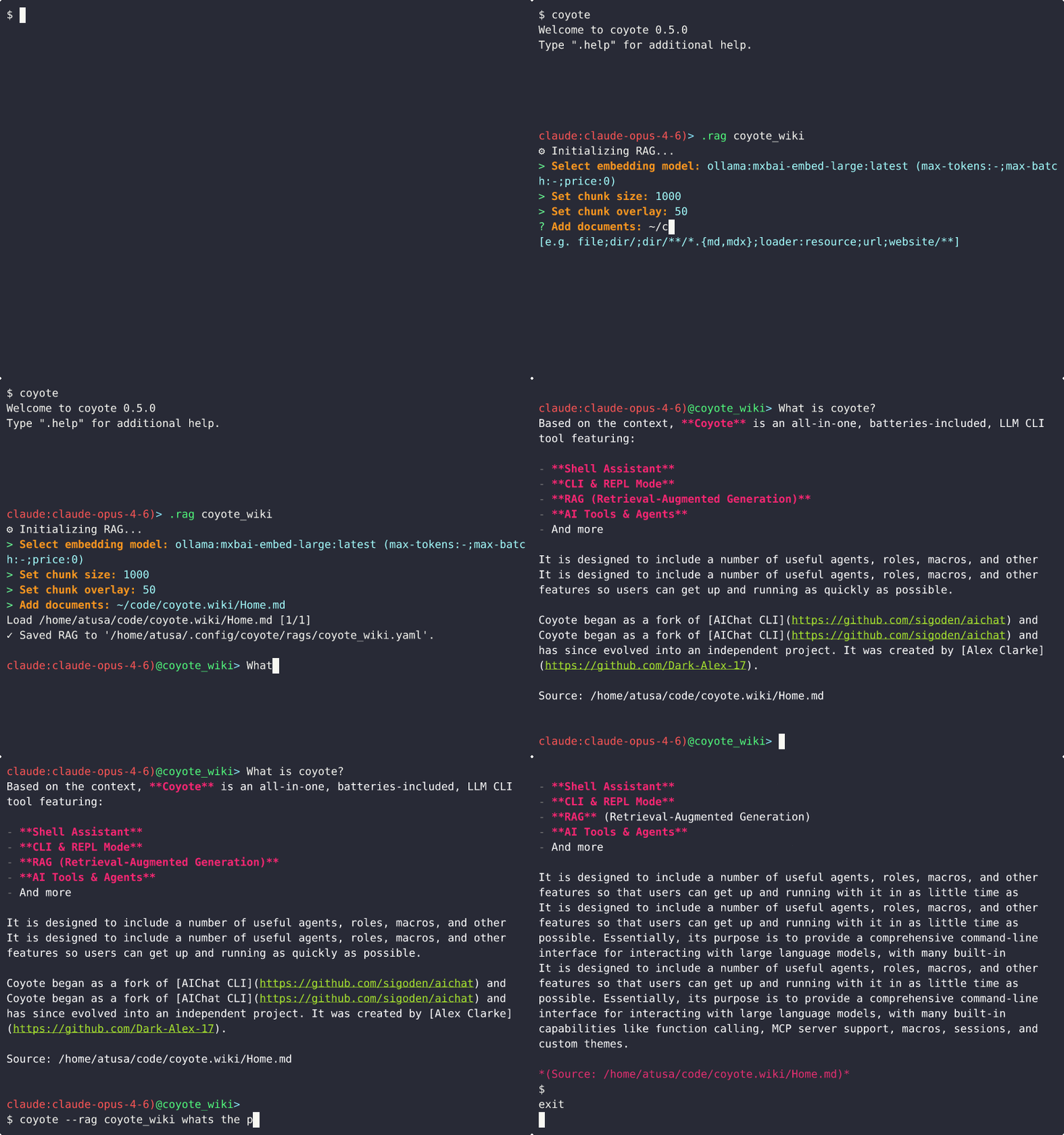
The generated RAG is then saved to the rag subdirectory of the Coyote configuration, and can then be loaded whenever you
want that knowledge base via either .rag <name> or coyote --rag <RAG>.
Ephemeral RAG
Short-lived RAG that is only used for a single session or query is loaded using .file/--file.
You can use it to either execute a prompt from a file, or for temporary RAG. The difference is the usage of the --
separator. If you only specify a filename and no -- separator, Coyote will know to read the file contents and pass them
as a query to the model. Otherwise, the -- separator is read to indicate that this is the end of the list of documents
to load into the ephemeral RAG, and what follows is the query to pass to the model.
.file prompt.md # Read the file as a prompt
.file %% -- translate the last reply to italian
.file `git diff` -- generate a commit message
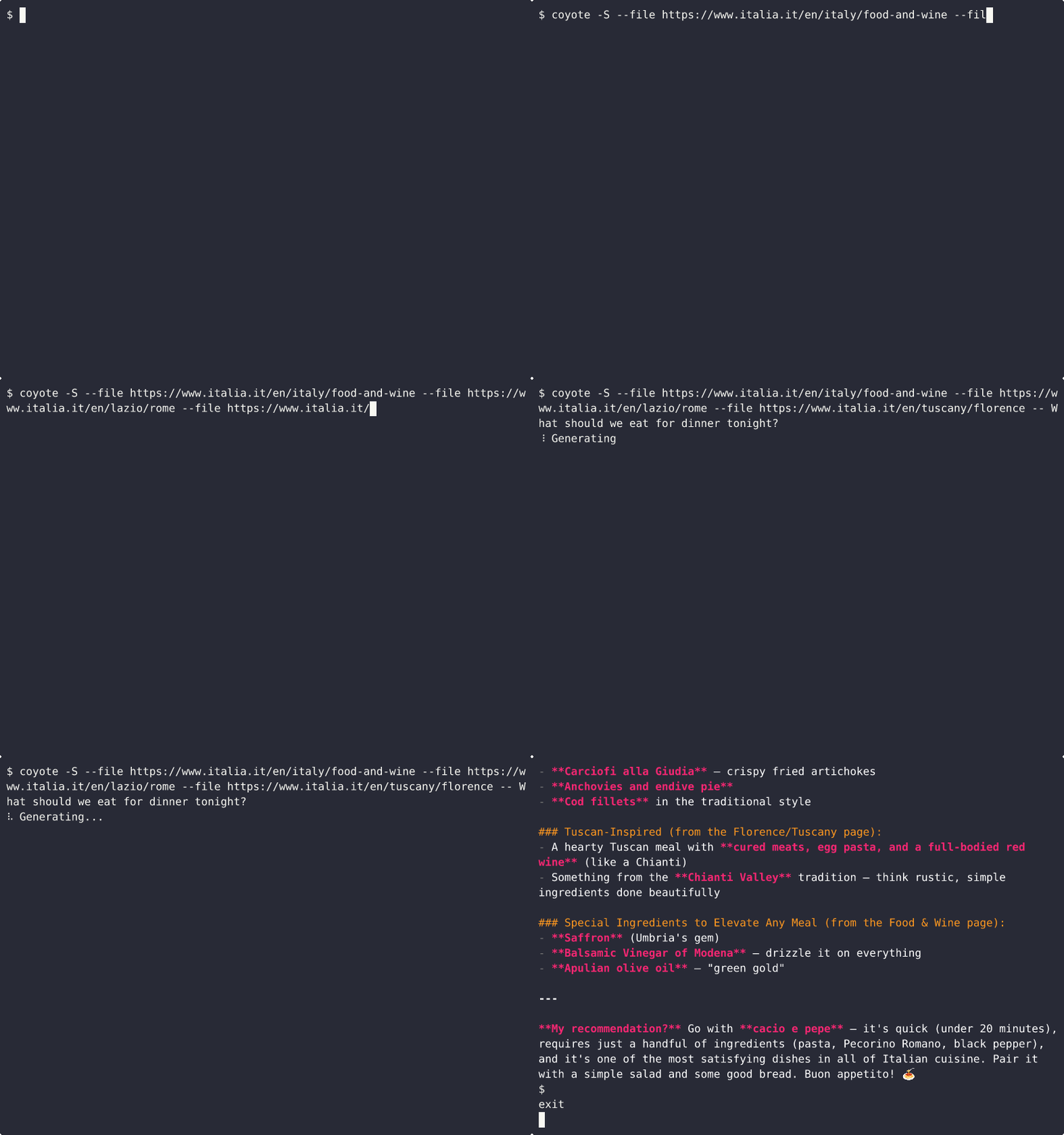
Once the session ends, this RAG will no longer be accessible and is only visible to the current session.
The %% Document Type
In addition to the usual documents that can be specified for persistent RAG, ephemeral RAG has a special %% value.
This value references the content of the last reply. So you can use it like this:
.file %% -- translate the last reply to italian
The -- indicates that this is the end of your documents and the beginning of your prompt.
The cmd Document Type
Coyote also lets you use command outputs for ephemeral RAG input. Simply enclose the command in backticks:
.file `git diff` -- generate a commit message
The -- indicates that this is the end of your documents and the beginning of your prompt.
How It Works
1. Build
When you define RAG, Coyote will first "build" the RAG. This means that Coyote will consume the documents you specified and generate embeddings for that text. This essentially just means that Coyote translates the document into a language the LLM can understand.
These embeddings are stored in a vector database. It is either in memory, on disk, or in a remote Qdrant collection, depending on the RAG's storage driver. Coyote also indexes every document chunk in a full-text search index (BM25) for keyword-based retrieval.
Building costs real time and real money: every chunk is sent to an embedding model, and every chunk is sent again to a
chat model if graph RAG is enabled. Adding or editing documents with .edit rag-docs only processes what actually
changed, but .rebuild rag deliberately re-embeds the entire corpus from scratch. You should only reach for it when a
document's contents changed underneath Coyote or the knowledge base looks wrong, not as routine maintenance.
If an extractor model is configured, Coyote additionally runs an LLM-based entity and relationship extraction pass over each document chunk and builds a knowledge graph of named entities and their connections. This graph is saved alongside the vector and BM25 indexes and enables a third, graph-based retrieval signal at query time.
2. Lookup
Coyote sits between you and the model. So when you submit a prompt to the model, before Coyote ever sends it, it runs a hybrid search over your knowledge base using two (or three) complementary signals:
- Vector search: Your query is converted to embeddings and matched against the document embeddings using cosine similarity (HNSW index).
- Full-text search (BM25): A keyword-based search that finds documents containing the same terms as your query.
- Graph search (only when graph-based RAG is enabled): Entities mentioned in your query are
looked up in the knowledge graph. Coyote expands up to
rag_graph_hopshops (default: 1) from matched entities, scoring neighbors by edge weight and query relevance, then returns documents linked to the highest-scoring entities.
The results from all active signals are merged via Reciprocal Rank Fusion (RRF), giving slightly more weight to semantic similarity:
| Signal | RRF Weight |
|---|---|
| Vector (HNSW) | 1.125 |
| Full-text (BM25) | 1.0 |
| Graph | 0.9 |
Coyote then passes the top n merged results as additional context to the model before your prompt.
2a. Reranking (Optional)
The lookup for relevant snippets of texts uses embeddings to find text that is semantically similar to your prompt, and
returns the top n-results. This often works fairly well, however these top results aren't always the most relevant for
answering the specific query.
Reranking improves these initial results (say, the top 20-100 text snippets) and re-scores them using a more sophisticated model. The reranker model will rank documents by their actual usefulness for answering the query to ensure the most relevant context is passed to the model alongside your query.
This reranking model can be customized for each RAG you build in Coyote. See the Custom Reranker section below for more details on how to customize this.
3. Prompt
Finally, the text snippets that were looked up in RAG are passed to the model as additional context to your prompt, giving the model query-specific context to answer your question.
Runtime Retrieval
When a RAG is attached and function calling is enabled, Coyote exposes a rag__query built-in tool so the LLM can run
additional retrieval on-demand during a turn. The up-front injection described in How It Works still
happens; rag__query is a follow-up channel for when the initial context does not cover the question.
Where it appears
- REPL
.rag <name>: Added when a RAG is attached, removed on.exit rag - Agents with
documentsconfigured: Auto-injected at agent init - Graph agents: Deliberately not exposed; graph agents drive retrieval explicitly via
ragnodes in the workflow
Use .info tools to confirm whether the tool is active for the next request. It is intentionally omitted from
.list tools because it is context-driven, not user-toggleable.
Signature
rag__query({ query: string, top_k?: integer })
Returns:
{
  "rag_name": "<name>",
  "count": 3,
  "chunks": [
    { "text": "...", "source": "path/or/url" }
  ]
}
top_k defaults to the RAG's configured top_k when omitted. Retrieval uses the same hybrid path (vector +
BM25 + optional graph + optional reranker) as up-front injection, so results are consistent whichever way retrieval
happens.
Storage Drivers
Every RAG picks a storage driver when it's created. The driver decides where your vectors and document text actually live: inside the RAG's own file, in a local database beside it, or in a Qdrant server you already run.
| Driver | Where the vectors live | Reach for it when |
|---|---|---|
yaml (default) |
In the RAG's own YAML file, loaded into memory on use | You want the simplest thing that works, or several Coyote processes need the same RAG at once |
duckdb |
A <name>.duckdb file beside the RAG |
The corpus is large enough that re-loading it into memory on every start is annoying |
qdrant |
A collection on a Qdrant server you already run | Something else already built and maintains the collection |
Coyote asks which one you want whenever it builds a knowledge base interactively, creating a RAG with .rag, an
agent starting up for the first time, or a graph agent's rag node:
? RAG storage driver:
> yaml   — portable, in-memory HNSW; usable from several Coyote processes at once (default)
  duckdb — persistent on-disk store; vectors and content survive restarts; HNSW approximate search.
If you don't care, take the default. yaml is what Coyote has always done.
Note
On Linux musl builds the prompt is skipped entirely: the duckdb driver needs a gnu build (musl binaries are statically linked, and a static binary cannot load DuckDB's
vss/ftsextensions), so Coyote notes as much and usesyaml. See Installation for which flavor you have and how to switch.
A RAG's driver is fixed when it's created. There is no conversion step. Switching means deleting the RAG and building it again, which re-embeds every document. Worth a moment's thought before you pick, but not worth agonizing over: for small corpora the difference is not something you'll notice.
yaml
The default. Vectors and document text are stored in the RAG's YAML file and read into memory when the RAG is loaded, where the HNSW index is built on the fly.
Its useful property is that nothing holds a lock: as many Coyote processes as you like can use the same RAG simultaneously. Its cost is startup: a large corpus means a large file to parse every time the RAG is loaded.
duckdb
Vectors, document text and the search indexes live in a <name>.duckdb file next to the RAG, and stay there between
runs. Nothing is rebuilt at startup, so loading a large RAG is quick regardless of size.
Three things are worth knowing before you choose it:
- Linux needs the gnu build. Coyote's musl binaries are statically linked, and a static binary cannot load DuckDB's extensions, so the duckdb driver is unavailable there: the wizard doesn't offer it, and a configuration that names it fails with an explanation. The install script prefers the gnu build automatically on x86_64 glibc systems; ARM Linux ships musl only, so duckdb is currently unavailable there.
- Concurrency is readers-or-writer. Several Coyote processes can query the same duckdb RAG at once. While one
process is ingesting or rebuilding it, though, the others can't read it until that finishes. If you routinely
run several Coyotes against one RAG and rebuild it often,
yamlwill annoy you less. - First use needs network access. DuckDB's vector (
vss) and full-text (fts) extensions are downloaded the first time a duckdb RAG is created, then cached and reused. On a machine that's offline from the start, create one duckdb RAG while connected and every later one works offline. Pre-installing them from a DuckDB shell is fiddlier than it sounds (the cache is keyed by DuckDB version, and Coyote bundles its own), so connecting once is much the easier route.
Deleting the RAG removes the .duckdb file and its write-ahead log along with it.
A duckdb RAG is two files: the <name>.yaml and the <name>.duckdb beside it. Copy, move or back up both
together. The YAML deliberately holds no vectors, so a RAG that arrives without its store loads without complaint,
still lists every indexed document, and answers every query with nothing. Coyote warns when it sees that combination
(i.e. indexed files, empty store) naming the file it expected. If the store is genuinely gone, .rebuild rag re-embeds
the corpus from scratch; .edit rag-docs will not refill it, because unchanged documents are skipped by hash.
qdrant - attaching an existing collection
The qdrant driver connects a RAG to a collection on a Qdrant server you already run. It is read-only: Coyote
queries the collection and never writes to it, so whatever populated it stays the sole owner of its contents. This is
the driver to use when another system, be that a LangChain pipeline, an ingestion job, a colleague's tooling, etc., and
it already maintains a collection you'd like to ask questions about.
Because the collection already exists, you don't create this kind of RAG with .rag; you attach it:
.rag attach my-docs
Coyote then walks you through it:
- Host: For example
qdrant.company.com:6333. - API key: Coyote asks whether the instance needs one, then which Vault secret holds it (defaulting to
QDRANT_API_KEY). If that secret doesn't exist yet you can create it right there, without leaving the wizard. The key itself is never written into the RAG file; only the secret's name is. - Collection: Coyote connects, lists what's available, and lets you pick.
It then checks the collection is actually usable and tells you what it found: the vector dimension, and a warning if the collection is empty (you can attach anyway, but every query will return nothing until something writes to it).
A collection has to meet two requirements:
- A single unnamed vector. Named or multi-vector collections are rejected, because Coyote queries with one unnamed vector and Qdrant would reject every request.
- Document text in a
page_contentpayload field. This is the field Coyote reads answers out of. Collections built by LangChain use this name by default.
Point IDs may be integers or UUIDs; both work.
A Qdrant on your own machine or network is contacted directly. If
HTTP_PROXYorHTTPS_PROXYare set in your environment, Coyote still reaches a loopback, private-range or.localhost without going through the proxy. A proxy that has never heard of your local server would otherwise refuse the connection outright. A remote Qdrant continues to honour whatever your environment configures.
Use the same embedding model that built the collection. Coyote can't detect a mismatch. The dimensions may line up perfectly while the vectors mean entirely different things. The symptom is retrieval that returns confident nonsense, so it's worth checking rather than discovering later.
Attached RAGs inside a sandbox
If you run Coyote in a sandbox, an attached RAG's host is allow-listed and its API key is handed to the sbx proxy automatically, so queries work inside the sandbox exactly as they do outside. See Sandboxes > Credentials & Secrets.
Supported Document Sources
Coyote supports a number of document sources that can be used for RAG:
| Source | Example | Comments |
|---|---|---|
| Files | /tmp/dir1/file1;/tmp/dir1/file2 |
|
| Directory | /tmp/dir |
Picks up all files in a directory and all its subdirectories |
| Directory (extensions} | /tmp/dir2/**/*.{md,txt} |
Finds all files in all subdirectories with the specified extensions |
| Recursive Filename | /tmp/*/COYOTE.md |
The following files will be picked up:
|
| URL | https://www.ohdsi.org/data-standardization/ |
Downloads and loads the specified webpage into the knowledge base |
| Recursive URL (Websites) | https://github.com/OHDSI/Vocabulary-v5.0/wiki/** |
Crawls all pages under the given URL and loads them into the knowledge base |
| Document Loader (custom) | jina:https://cloud.google.com/bigquery/docs/reference/standard-sql/ |
Use a custom document loader to parse the given document |
Document Loaders
Coyote only has built-in support for loading text files. But that functionality can be extended to read all kinds of files
into your knowledge bases. These custom loaders are used by both RAG and for documents specified using the
.file/--file flags.
In the global configuration file, you can specify loaders for specific document types using the document_loaders
setting. Each loader is defined by specifying a name and then a command that Coyote will execute to load the document.
The following variables are interpolated at runtime by Coyote and can be used as placeholders in your command definitions:
$1(Required) - The input file$2(Optional) - The output file. If omitted,stdoutis used as the output destination
Note: It is your responsibility to ensure that any tools used to parse documents into text that Coyote can read are
installed on your system and are available on your $PATH. Coyote does not have any built-in way of installing
dependencies for document loaders for you.
The following are some example loaders:
document_loaders:
  pdf: 'pdftotext $1 -'                                                                 # Use pdftotext to convert a PDF file to text
                                                                                        # (see https://poppler.freedesktop.org for details on how to install pdftotext)
  docx: 'pandoc --to plain $1'                                                          # Use pandoc to convert a .docx file to text
                                                                                        # (see https://pandoc.org for details on how to install pandoc)
  jina: 'curl -fsSL https://r.jina.ai/$1 -H "Authorization: Bearer {{JINA_API_KEY}}'    # Use Jina to translate a website into text;
                                                                                        # Requires a Jina API key to be added to the Coyote vault
  git: >                                                                                # Use yek to load a git repository into the knowledgebase (https://github.com/bodo-run/yek)
    sh -c "yek $1 --json | jq 'map({ path: .filename, contents: .content })'"
Document Loader Usage
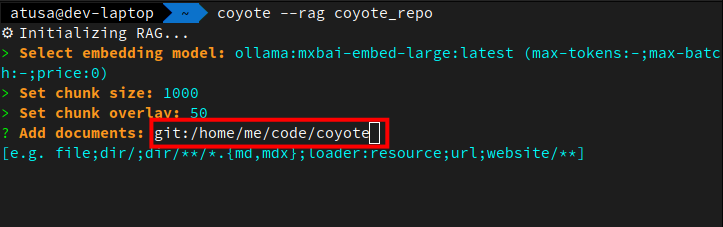
Once you have your loaders defined, you can specify when Coyote should use them by prefixing any RAG file/directory/URI with the name of the loader.
Example: Load a git repo into RAG
Example: Use pdf loader for ephemeral RAG
$ coyote --file pdf:some-file.pdf
Advanced Customizations
For those familiar with RAG, Coyote exposes a handful of advanced global settings that can be used to tweak your default RAG configurations.
Embedding Model
When Coyote queries your RAG knowledge bases, it needs to first convert your query into embeddings. By default, Coyote uses the same embedding model that was used to create the knowledge base in the first place.
This can be customized to any other embedding model available in your configured clients by setting the
rag_embedding_model setting in your global Coyote configuration file:
rag_embedding_model: null # Specifies the embedding model used for context retrieval
Reranker
By default, Coyote uses Reciprocal Rank Fusion (RRF) to merge results from all active retrieval signals (vector, BM25, and graph when enabled). See How It Works for the exact weights.
When a reranker model is set it replaces RRF: the union of vector and BM25 candidates is re-scored by the reranker for direct query relevance, and graph-based search is not applied. You can change the default reranker model to any reranking model in your configured clients:
rag_reranker_model: null # Reranker model; when set, replaces RRF (graph search is not applied)
Graph-Based RAG
When Coyote builds a knowledge base, it can optionally run an LLM-based entity and relationship extraction pass over each document chunk to construct a knowledge graph. At query time, this graph becomes a third retrieval signal alongside vector and full-text search.
To enable graph-based RAG, set rag_extractor_model to any chat model in your configured clients:
rag_extractor_model: null # Chat model for entity/relationship extraction; enables graph RAG when set
When set, Coyote extracts named entities and their relationships from each chunk at build time and stores a
knowledge graph alongside the vector and BM25 indexes. At query time, entities in your query are matched
against the graph and neighbors are expanded up to rag_graph_hops hops to surface documents linked to those
entities. This graph signal is then fused into the hybrid search result via Reciprocal Rank Fusion.
Graph-based RAG and reranking are mutually exclusive. If a
rag_reranker_modelis also set, the reranker replaces RRF entirely and the graph signal is not applied. See Reranker for details.
Graph expansion depth
rag_graph_hops controls how many hops to expand from matched entities at query time (default: 1):
rag_graph_hops: 1 # 0 = seed nodes only; 1 = direct neighbors; 2 = neighbors of neighbors; etc.
0: Returns only documents directly linked to query-matched entities; no graph traversal.1(default): Expands to entities directly connected to query matches. Good for most corpora.2+: Traverses further into the graph, surfacing more loosely related documents. Useful for dense, highly interconnected knowledge bases (e.g. ontologies, large technical wikis). May increase noise on sparse corpora.
Custom extraction prompt
By default, Coyote uses a built-in prompt that extracts entities of types PERSON, ORGANIZATION, CONCEPT,
TECHNOLOGY, LOCATION, EVENT, and OTHER. For domain-specific corpora you can override this with
rag_extractor_prompt:
rag_extractor_prompt: null # Custom extraction prompt; must contain __CHUNK__ placeholder
The prompt must contain the literal string __CHUNK__, which Coyote replaces with the document chunk at
extraction time. The response must be a JSON object with entities and relationships arrays in the same
structure the built-in prompt produces. Example custom prompt for a legal corpus:
Extract legal entities and relationships from the following text.

Return JSON:
{
  "entities": [{"name": "...", "type": "STATUTE|CASE|PARTY|COURT|CONCEPT", "description": "..."}],
  "relationships": [{"from": "...", "to": "...", "type": "cites|governs|decided_by", "weight": 0.9}]
}

Only extract what is clearly stated. Return ONLY the JSON object.

Text:
__CHUNK__
Extractor model guidance
- Use a fast, cheap chat model. e.g.
anthropic:claude-haiku-4-5oropenai:gpt-4o-mini. Extraction runs once per chunk at build time, so speed and cost matter more than raw capability. - Graph-based RAG is most useful for knowledge bases with rich entity relationships: technical documentation, research papers, wikis. For small corpora or plain prose, vector + BM25 alone is usually sufficient.
- Individual
ragnodes in graph agents can override this with their ownextractor_model,extractor_prompt, andgraph_hopsfields. See Graph-Agents for details. - The extractor model is prompted interactively when you create a new RAG knowledge base via
.rag. If you skip it, the knowledge base uses vector + full-text search only (no graph).
Chunk Size
In the context of RAG, the chunk size is the maximum length of each text chunk (measured in characters) that is created
when splitting documents. In Coyote, this defaults to 2000 characters.
You can specify a different global default by setting the rag_chunk_size property in your global configuration file:
rag_chunk_size: null # Defines the size of chunks for document processing in characters
Chunk Size Trade-Offs
Keep in mind the following trade-offs when changing the chunk size:
- Smaller chunks (e.g. 256 characters): More precise retrieval, better semantic focus, but may lack context or split important information
- Larger chunks (e.g. 1024 characters): More context preserved, fewer chunks to manage, but less precise matching and more noise in retrieved document
Chunk Overlap
Chunk overlap in RAG is the number of characters that overlap between consecutive chunks to maintain continuity.
Example: If the following sentence is cut off at the end of one chunk
I was doing fine until someone brought up
You'll ideally want that full sentence to be picked up at the beginning of the next chunk to make sure the full meaning is captured. So in this example, if your chunk overlap is 42 characters, then the start of the next chunk would look like this:
I was doing fine until someone brought up the game. <next sentence>
Often, this value is 10%-20% of the chunk size.
By default, in Coyote, this value is 5% the chunk size. You can override this and specify the default chunk overlap (in
characters) that Coyote should use as a global default by setting the rag_chunk_overlap property in the global Coyote
configuration file:
rag_chunk_overlap: null # Defines the overlap between chunks
Top K
In RAG, top_k represents the top k-chunks to return from the vector database query. Think of it like if you search
something on Google and only care about the top 10 results, that's what you'll use for your context.
In Coyote, the default value for this is 5. You can customize this global default by setting the rag_top_k property in
your global configuration file:
rag_top_k: 5 # Specifies the number of documents to retrieve for answering queries
Top K Trade-Offs
When customizing this value, keep in mind the following trade-offs so you get the best performance:
- Lower top_k (e.g. 3): Faster, more focused context, lower cost, but risks missing relevant information
- Higher top_k (e.g. 10): More comprehensive coverage, but more noise, higher latency, increased token costs, and potential context window constraints
RAG Template
When you use RAG in Coyote, after Coyote performs the lookup for relevant chunks of text to add as context to your query, it
will add the retrieved text chunks as context to your query before sending it to the model. The format of this context
is determined by the rag_template setting in your global Coyote configuration file.
This template utilizes three placeholders:
__INPUT__: The user's actual query__CONTEXT__: The context retrieved from RAG__SOURCES__: A numbered list of the source file paths or URLs that the retrieved context came from
These placeholders are replaced with the corresponding values into the template and make up what's actually passed to
the model at query-time. The __SOURCES__ placeholder enables the model to cite which documents its answer is based on,
which is especially useful when building knowledge-base assistants that need to provide verifiable references.
The default template that Coyote uses is the following:
Answer the query based on the context while respecting the rules. (user query, some textual context and rules, all inside xml tags)

<context>
__CONTEXT__
</context>

<sources>
__SOURCES__
</sources>

<rules>
- If you don't know, just say so.
- If you are not sure, ask for clarification.
- Answer in the same language as the user query.
- If the context appears unreadable or of poor quality, tell the user then answer as best as you can.
- If the answer is not in the context but you think you know the answer, explain that to the user then answer with your own knowledge.
- Answer directly and without using xml tags.
- When using information from the context, cite the relevant source from the <sources> section.
</rules>

<user_query>
__INPUT__
</user_query>
You can customize this template by specifying the rag_template setting in your global Coyote configuration file. Your
template must include both the __INPUT__ and __CONTEXT__ placeholders in order for it to be valid. The
__SOURCES__ placeholder is optional. If it is omitted, source references will not be included in the prompt.