Welcome to the Coyote Wiki!
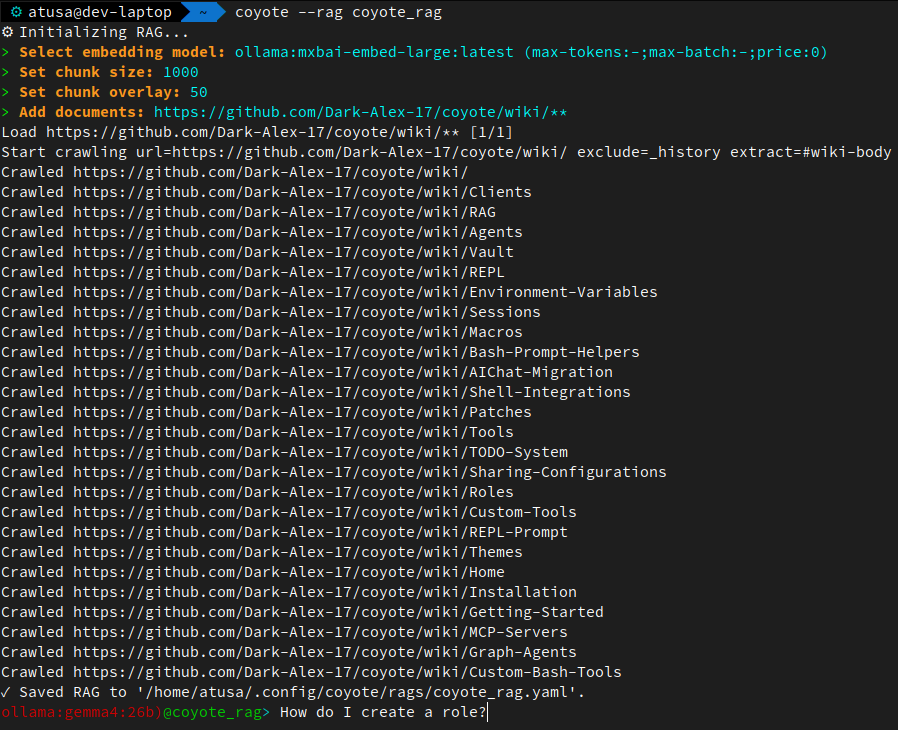
A helpful way to use this wiki is to create a RAG from it and then ask questions about Coyote, with Coyote! Here's an example on how to create a RAG from this wiki and then ask a question about Coyote:
Coyote is an all-in-one, batteries-included LLM runtime for building, running, and interacting with AI from your terminal. It brings together a Shell Assistant, CLI & REPL modes, RAG, tools, agents, MCP, skills, sandboxes, multi-agent workflows, and more in a single runtime.
Coyote comes ready to use with built-in agents, roles, macros, and tools, so you can get started without assembling an AI stack from scratch. When you want to extend it, entire bundles of agents, roles, macros, tools, MCP servers, and other configurations can be installed directly from any Git repository.
See Bundles to learn how to create, install, and share Coyote bundles.

Coming from AIChat? Follow the migration guide to get started.
Quick Links
- AIChat Migration Guide: Coming from AIChat? Follow the migration guide to get started.
- Installation: Install Coyote
- Getting Started: Get started with Coyote by doing first-run setup steps, and learn the basics.
- Bundles: Install bundles of agents, roles, macros, tools, and MCP servers from any git repo, and share your own. Bundles are Coyote's equivalent of plugins in other CLI agents.
- REPL: Interactive Read-Eval-Print Loop for conversational interactions with LLMs and Coyote.
- Custom REPL Prompt: Customize the REPL prompt to provide useful contextual information.
- Vault: Securely store and manage sensitive information such as API keys and credentials.
- Sandboxes: Launch Coyote inside an isolated Docker Sandbox with one command. Host config and vault credentials are projected in automatically; everything else is delegated to the
sbxCLI. - Shell Integrations: Seamlessly integrate Coyote with your shell environment for enhanced command-line assistance.
- Function Calling: Leverage function calling capabilities to extend Coyote's functionality with custom tools
- Creating Custom Tools: You can create your own custom tools to enhance Coyote's capabilities.
- First-Class MCP Server Support: Easily connect and interact with MCP servers for advanced functionality.
- Supports all three MCP capabilities: tools, resources, and prompts, with capability-gated meta-tools for the model and a
.promptREPL command for invoking server prompts yourself. - Per-server tool whitelists (with glob patterns) restrict exactly which MCP tools the model can see and call. Configurable globally, per role, agent, session, skill, or graph node.
- Supports all three MCP capabilities: tools, resources, and prompts, with capability-gated meta-tools for the model and a
- Macros: Automate repetitive tasks and workflows with Coyote "scripts" (macros), and invoke them as your own custom REPL commands.
- RAG: Retrieval-Augmented Generation for enhanced information retrieval and generation.
- Sessions: Manage and persist conversational contexts and settings across multiple interactions.
- Memory: Persistent file-based memory that survives across sessions. Bootstrap with
coyote --init-memory [global|workspace]. - Workspace Instructions: Human-curated project instructions (
COYOTE.md) injected into every prompt, withAGENTS.md/CLAUDE.md/GEMINI.mdfallbacks for cross-tool compatibility. Scaffold withcoyote --init-instructions. - Roles: Customize model behavior for specific tasks or domains.
- Skills: Modular knowledge or capability packs the LLM can load and unload mid-conversation. Multiple skills compose; instructions stack, tools and MCPs union.
- Agents: Leverage AI agents to perform complex tasks and workflows, including sub-agent spawning, teammate messaging, and user interaction tools.
- Graph Agents: Define an agent as a declarative, YAML-driven workflow. A directed graph of typed nodes (LLM calls, scripts, approvals, user input, RAG retrieval, sub-agent spawns).
- Background Jobs: Run long tool calls (builds, test suites, slow MCP calls) in the background with the
job__*tools while the model keeps working, and completion arrives as a push notification. - Todo System: Built-in task tracking for improved LLM reliability with smaller models.
- Environment Variables: Override and customize your Coyote configuration at runtime with environment variables.
- Client Configurations: Configuration instructions for various LLM providers.
- Authentication (API Key & OAuth): Authenticate with API keys or OAuth for subscription-based access.
- Patching API Requests: Learn how to patch API requests for advanced customization.
- Custom Themes: Change the look and feel of Coyote to your preferences with custom themes.
- History: A history of how Coyote came to be.
History
Coyote began as a fork of AIChat CLI and has since evolved into an independent project.
See CREDITS for full attribution and background.