
123 lines
4.9 KiB
Markdown
123 lines
4.9 KiB
Markdown

|
|
|
|
# HTPC powered by k3s
|
|
|
|
|
|
|
|
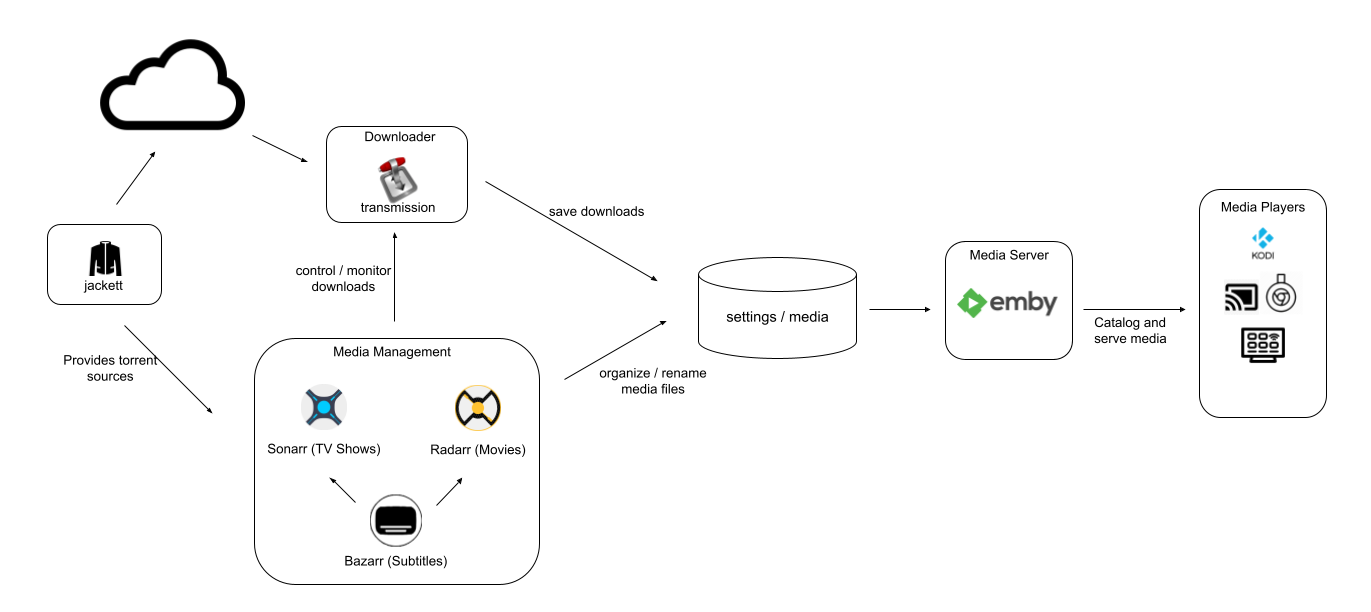
This is my current [HTPC](https://en.wikipedia.org/wiki/Home_theater_PC) setup. It runs on [k3s](https://k3s.io/) - a lightweight and easy to install Kubernetes distribution.
|
|
It includes the following applications:
|
|
|
|
* [Sonarr](https://sonarr.tv/) for tv shows
|
|
* [Radarr](https://radarr.video/) for movies
|
|
* [Bazarr](https://github.com/morpheus65535/bazarr) for subtitles
|
|
* Transmission for torrents
|
|
* [Jackett](https://github.com/Jackett/Jackett)
|
|
* [Emby](https://emby.media/)
|
|
|
|
Applications state (settings / db) and media files are stored in a shared volume of type `hostPath`. It does not use PVC and currently only works if the whole `htpc` namespace is deployed in the same node.
|
|
|
|
## Getting Started
|
|
|
|
### Quickstart
|
|
|
|
```bash
|
|
# for x86_64
|
|
kubectl apply -f https://raw.githubusercontent.com/fabito/htk8s/v0.1/install_x86_64.yaml
|
|
|
|
# for raspberry pi (ARM)
|
|
kubectl apply -f https://raw.githubusercontent.com/fabito/htk8s/v0.1/install_armhf.yaml
|
|
```
|
|
|
|
### The Gitops way
|
|
|
|

|
|
|
|
|
|
```bash
|
|
# x86_64 only
|
|
kubectl apply -f https://raw.githubusercontent.com/fabito/htk8s/v0.1/install_argocd.yaml
|
|
```
|
|
|
|
This alternate manifest will install [Argo CD](https://github.com/argoproj/argo-cd) along with the [htpc application](argocd/application.yaml). Then it will monitor this repo for changes and apply them to the cluster accordingly (more specifically the `overlays/x86`overlay).
|
|
|
|
You can access the Argo CD ui at: https://localhost/argocd.
|
|
|
|
### Verifying the installation
|
|
|
|
All resources are created in the `htpc` namespace. So if you run:
|
|
|
|
```bash
|
|
k3s kubectl get all -n htpc
|
|
```
|
|
|
|
You should get something similar to:
|
|
|
|
```bash
|
|
NAME READY STATUS RESTARTS AGE
|
|
pod/bazarr-795f88c5c9-w75l7 1/1 Running 0 24h
|
|
pod/emby-6f457df664-fqbmc 1/1 Running 0 24h
|
|
pod/jackett-6bcf6cd8d6-lrh6j 1/1 Running 0 24h
|
|
pod/radarr-5c965c7678-zt8sq 1/1 Running 0 24h
|
|
pod/sonarr-b65c8956-mxng4 1/1 Running 0 24h
|
|
pod/transmission-5f7fdc6cb5-nrtbb 1/1 Running 0 24h
|
|
|
|
NAME TYPE CLUSTER-IP EXTERNAL-IP PORT(S) AGE
|
|
service/bazarr ClusterIP 10.43.43.224 <none> 6767/TCP 24h
|
|
service/emby ClusterIP 10.43.212.198 <none> 8096/TCP 24h
|
|
service/jackett ClusterIP 10.43.104.233 <none> 9117/TCP 24h
|
|
service/radarr ClusterIP 10.43.141.101 <none> 7878/TCP 24h
|
|
service/sonarr ClusterIP 10.43.35.98 <none> 8989/TCP 24h
|
|
service/transmission ClusterIP 10.43.184.198 <none> 9091/TCP 24h
|
|
|
|
NAME READY UP-TO-DATE AVAILABLE AGE
|
|
deployment.apps/bazarr 1/1 1 1 24h
|
|
deployment.apps/emby 1/1 1 1 24h
|
|
deployment.apps/jackett 1/1 1 1 24h
|
|
deployment.apps/radarr 1/1 1 1 24h
|
|
deployment.apps/sonarr 1/1 1 1 24h
|
|
deployment.apps/transmission 1/1 1 1 24h
|
|
|
|
NAME DESIRED CURRENT READY AGE
|
|
replicaset.apps/bazarr-795f88c5c9 1 1 1 24h
|
|
replicaset.apps/emby-6f457df664 1 1 1 24h
|
|
replicaset.apps/jackett-6bcf6cd8d6 1 1 1 24h
|
|
replicaset.apps/radarr-5c965c7678 1 1 1 24h
|
|
replicaset.apps/sonarr-b65c8956 1 1 1 24h
|
|
replicaset.apps/transmission-5f7fdc6cb5 1 1 1 24h
|
|
```
|
|
|
|
You should also be able to reach each component's ui using the links below. Don't forget to replace `localhost` by the IP or the server name running k3s.
|
|
|
|
|App|URI
|
|
|---|---
|
|
|radarr|http://localhost/radarr
|
|
|sonarr|http://localhost/sonarr
|
|
|bazarr|http://localhost/bazarr
|
|
|jacket|http://localhost/jackett
|
|
|transmission|http://localhost/transmission
|
|
|emby|http://localhost/
|
|
|
|
Check the [ingress.yaml](base/ingress.yaml) for more details.
|
|
|
|
Each module except for Emby is configured to respond on a custom basepath (check the init containers logic for more details).
|
|
|
|
## How it works (WIP)
|
|
|
|
It uses [LinuxServers](https://www.linuxserver.io/our-images/) images.
|
|
|
|
It uses a `hostPath` volume to store configuration and media files. It defaults to the `/opt/htpc` directory
|
|
|
|
```bash
|
|
/opt/htpc
|
|
├── bazarr
|
|
├── downloads
|
|
├── emby
|
|
├── jackett
|
|
├── media
|
|
│ ├── movies
|
|
│ └── tv
|
|
├── radarr
|
|
├── sonarr
|
|
└── transmission
|
|
```
|